The paint tool, available in Google Doc, Sheets, and Slides is a convenient feature that provides a quick and easy way to format text. You're invited to watch the video below for an overview of how the paintbrush tool works and receive tips to assist with getting started!

Welcome to the Teach.Learn.Collaborate (TLC) Blog: A place for all Hudson staff members to receive media and tech updates/tips to maximize instruction and daily workflows. This blog is maintained by Kristin Dages & Stephanie Swiderski.
Monday, February 19, 2018

Tuesday, February 13, 2018
Favorite Chromebook Shortcuts
Looking to be quicker and more efficient on your Chromebook? Check out these top Chromebook shortcuts!
Ctrl + N Open a new window
Alt + F4 Close a window
Ctrl + F Search within a document for a particular word or phrase
Ctrl + F5 Take a full screenshot
Ctrl + Shift + F5 Take a partial screenshot (drag area you need to capture)
Ctrl + Alt + ? Find out more shortcuts!
Email Members of a Team Drive
Team Drives make it easier for teams to store, search, and access important files, especially as team members change over time. To improve collaboration in Team Drives, we’re adding the ability to email all the members of a Team Drive.

There are two ways to email members of a Team Drive:
There are two ways to email members of a Team Drive:
- From the Team Drive: Navigate to the Team Drive, click the drop-down menu next to the Team Drive name, and click “Email members.”
- From within a file that is in the Team Drive: While editing or viewing the document, open the File menu, and click “Email Collaborators.”
YouTube Restricted Dates During AIR Testing
It’s hard to believe that AIR testing is right around the corner. We want to give you plenty of advance notice to plan ahead instructionally to accommodate for YouTube services being unavailable to students on the days AIR exams are being administered in grades 3-12. On District AIR testing days, student access to YouTube will be restricted to preserve bandwidth for testing and inhibit higher volume traffic, like video streaming, that places higher stress on the network. Teachers' YouTube access will not be interrupted during AIR testing.
Student access to YouTube will be restricted from 7:30 am - 3:30 pm on the following District AIR testing days.
April 9th
April 10th
April 11th
April 12th
April 13th
April 16th
April 17th
April 18th
April 19th
April 20th
April 25th
April 26th
April 30th
May 1st
May 2nd
May 3rd
May 4thTuesday, February 6, 2018
New Tech Tools to Try in the New Year
New Tech Tools to Try in the New Year
Learn with INFOhio Webinar
Presenter: Michael Roush
@mdroush
Here's the breakdown of the ten tools he goes over within the hour-long webinar and the timestamp of each in case you just want to get to what you're interested in. He only spends about five to ten minutes on each, so jump to the tool you want and save time or watch the entire webinar and earn a fancy certificate of completion. 👍
Tech Tool Webinar Breakdown
1. Flipgrid (go to 5:38) — Video social learning tool
2. Seesaw (go to 11:52) — Online portfolio platform
3. Read&Write (go to 21:24) — Assistive toolbar for all, updates and new features
4. Edublogs (go to 26:44) — Writing for an authentic audience
5. Feedbro (go to 30:30) — RSS feed manager
6. Canva (go to 35:00) — Design program
7. Iorad (go to 37:28) — Tutorial Builder
8. Recap (go to 41:46) — Question-led chat tool with video for discussion and reflection
9. BookCreator (go to 49:10) — Create. Read. Publish. Digital notebook for the 21st Century Classroom
10. iCivics (go to 53:25) — Lesson plans, activities, games, and more
**Click the image below to view the webinar. You should not need our INFOhio login now thanks to geolocation (woot!), but let me know if you experience any issues.**

Link to the INFOhio Webinar page.

Roush made a great point at the end of this webinar. We shouldn't blame the tech tool when it doesn't work out.
We need to look at our implementation and the way we teach (audience, purpose, strategies) and rethink it.
Click the slide below to access Roush's PowerPoint.

Tuesday, January 30, 2018
WVIZ/PBS ideastream Update - January 2018

We have an amazing resource at our fingertips in Northeast Ohio with ideastream's Educational opportunities.
Here are the top 10 IDEAs from January's Advisory Council Meeting. Click on the images below to learn more about each educational resource.
IDEA 10: Online Learning Opportunities
Click on the word cloud below to view all of the professional development opportunities offered through ideastream over the next few months.


IDEA 9: StateImpact Ohio
Stay updated on the state of education in Ohio with this resource.

IDEA 8: Be Well Special -
Exploring the Impact of Opioids Crisis on NE Ohio
View the half-hour special below or click here for more resources on Opioids in NE Ohio.
View the half-hour special below or click here for more resources on Opioids in NE Ohio.
IDEA 7: OETC
Ohio Educational Technology Conference
February 13 - 15, 2018
February 13 - 15, 2018
Learn remotely by following OETC on Twitter with #OETC18 to see all of the resources posted by presenters and attendees.

IDEA 6: Digital Learning Day
Feb. 22nd
Full Day of “live” professional learning (recorded option as well)
Starting every ½ hour throughout the day
30-Minute Sessions

IDEA 5: INFOhio Learning Session
IT Coaches and Coordinators, Media Specialists, Classroom Teachers
May 1, 2018
9:30-3:00 PM
BYOL and BYOD
Click on the image below to learn more...

INFOhio Update:
****Use of Geolocation****
Students are now recognized based on location and don’t need to log into INFOhio's digital resources when away from school
IDEA 4: Distance Learning
Living Black History at Lake View Cemetery
February 7, 14, 21, 28
10 am each of these days
Free

IDEA 3: NewsDepth
An award-winning multi-media program geared toward Ohio's students and standards

Service Learning Connection:
Do you have students making a difference in the community?
Nominate them to be an A Plus on the next episode.
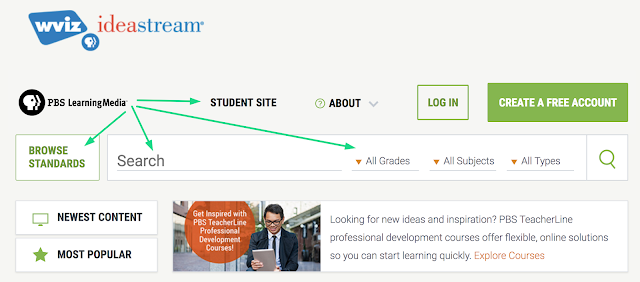
IDEA 2: PBL Learning Media
Added Ohio StandardsGoogle Classroom Integration
Share links
Create folders
https://ideastream.pbslearningmedia.org/
IDEA 1: Innovative Educator Nominations
Nominations due Wed. Feb. 21stNominate at https://www.surveymonkey.com/r/JDFTS8M
Takes only a few minutes to nominate (summary 250 words)
Winners will know by end of March
http://www.ideastream.org/innovative-educators-nominations-now-open

Sunday, January 21, 2018
Google Classroom: Adding co-teachers
Watch the video below to find out how to add co-teachers in Google Classroom.
When teachers ask how to add co-teachers, it's usually followed by, "What permissions will they have?"
There are a few class permissions to be aware of:
- Only the primary teacher can delete a class. They're able to shift ownership to a co-teacher.
- The primary teacher can't unenroll or be removed from a class.
- Teachers can't be muted in a class.
- The primary teacher owns the class Google Drive folder.
- After a co-teacher joins the class, the co-teacher has access to the class Google Drive folder.
Subscribe to:
Posts (Atom)