Wednesday, January 30, 2019

Streaming Video in the Classroom


Streaming Video


With the rise in home streaming services and the decrease in physical formats, such as VHS and DVDs, let's take a look at how we, as teachers, are able to continue to show quality content within the classroom. 

We've put together guidelines that enable you to still utilize streaming services, such as Hulu, Netflix, and Amazon Prime but with the understanding that only specific content is covered. 

Like many districts around the country in the age of streaming, we have researched and found a public performance license through Swank Movie Licensing USA that enables us to play video within the classroom and other indoor large group events. 

The guidelines linked to every building library site walk you through a quick answer and a long answer as to why this public performance license is necessary, including the copyright law and license agreements made with single-home streaming services. It also offers you three simple steps on how to continue to stream: 

What Can You Stream?
We have multiple avenues to maintain the ability to stream:
  1. Check Netflix’s Original Documentary List - Link
  2. Check Swank Movie Licensing USA site for content covered under our subscription for you to show via any format (DVD, streaming subscriptions, etc.). Link
  3. Utilize the various options below (linked on our district site) that provides excellent streaming content for the classroom.
    • PBS LearningMedia, Discovery Education, BrainPOP, etc.

Being told that we can't do something because of copyright law and license user agreements isn't fun...so true! However, as you know, we have an obligation, as educators, to teach our students and each other that their creativity, published content, and products have value, just like the content we consume on a daily basis. 

One final and super important note!Our end-goal is to provide you with all of the tools you need to continue doing the amazing job you're already doing within the classroom. Streaming services are unblocked for staff and accessible in your classroom. 


If there is content that you want to show but is not listed under our movie licensing site or Netflix original documentary list, please let Kristin Dages or your building media specialist know. We will reach out to the publishers or filmmakers for written consent to show it in the classroom. We've done it before with success!


Link to Guidelines


Thanks for reading and for all you do in the classroom! 
As streaming services update, we'll continue to adapt and communicate any changes. 


WVIZ/PBS ideastream Updates - January & February 2019


 January & February 2019


Where: Hiram College

Explore the mindful use of technology and enjoy the outdoors!  
Graduate Credit Available!

Seeking proposals now! 
*Click on the image above for more information and to see last year's schedule of events. 


NPR's first-ever podcast challenge for students! 

Grades 5-12
Podcasts should be 3-12 minutes

Due by March 31st
*Click here or on the image above for more information, including a submission guide and rules.


Image result for occrra logo

Step Up to Quality (SUTQ) HoursOhio-Approved Trainings for Early Childhood Education
Free workshops on self-regulation, positive behaviors, resilience, stem, and more!


*Click here or on the image above for training list and registration - most are on Saturdays (6 hrs each)


Maker dans la culture de l'Espagne - Ceux qui sont et ce ...

Teachers, grades 4-12, are invited to register as a pair to learn how to supplement instruction with design and coding.
Each pair of teachers will receive two 3D Pens with Filament, one Makey Makey Invention kit, one Arduino Starter Kit, one Getting Started with Arduino book, and two Worlds of Making books.

Thursday, March 14   | 8:30-11:30 a.m. |  The Idea Center
Cost:  $335/pair (grad credit available)


Careers in Classical Music
There are many performing and non-performance jobs in the classical music industry. This hour-long program will feature performance professionals, educators, and business professionals who work in the field.  Students from the Cleveland Institute of Music will perform.

Co-Hosts:
Bill O’Connell Heather  Young Mandujano
Program Director Virtual Learning
WCLV, 104.9 Educational Coordinator


Thursday, February 21  | 1-2 p.m.

Bring students to the “live” performance at The Idea Center
OR

Register to stream:  Contact eric.siler@ideastream.org by 2/19

Sign up to attend with students:  eric.siler@ideastream.org by 2/15

Grade Level: 7-12


Applause Performance: Jarrelle Barton

Chinese zither musician, Jarrelle Barton will perform and answer questions while in Northeast Ohio celebrating the Chinese New year.

Monday, February 4 | 12:40 p.m.
Facebook Live Performance Event Link


Upcoming Courses for Graduate Credit or Contact Hours:

An Introduction to Underlying Principles and Research for Effective Literary Instruction
3 credit hours (45 hours) | For educators serving K-8 | $300

Phonemic Awareness & Phonics: A Window Into Exemplary Instruction
3 credit hours (45 hours) |  K-3 | $300

Graphic Organizers for 21st Century Learning
2 credit hours (30hours) | K-12 | $225

Vocabulary as a Foundation for Learning
3 credit hours (45 hours) | PreK-3 |$300

Teaching Phonics & spelling for Beginning and Transitional Readers
3 credit hours (45 hours) |  K-3 | $300
Teaching Reading in Content Areas
2 credit hours (30 hours) | 3-12 | $225
Raising Readers: Preparing Preschoolers for Success
1 credit hour (15 hours) | PreK-K | $125
Differentiating Math for a Range of Learners
3 credit hours (45 hours) | K-2 |$300


Ashland University Graduate Credit = $170


Time Span:  4 weeks | Begin 2/13


More information click here.


Click here for more information!


February is Black History Month


From the Black History Month Collection:


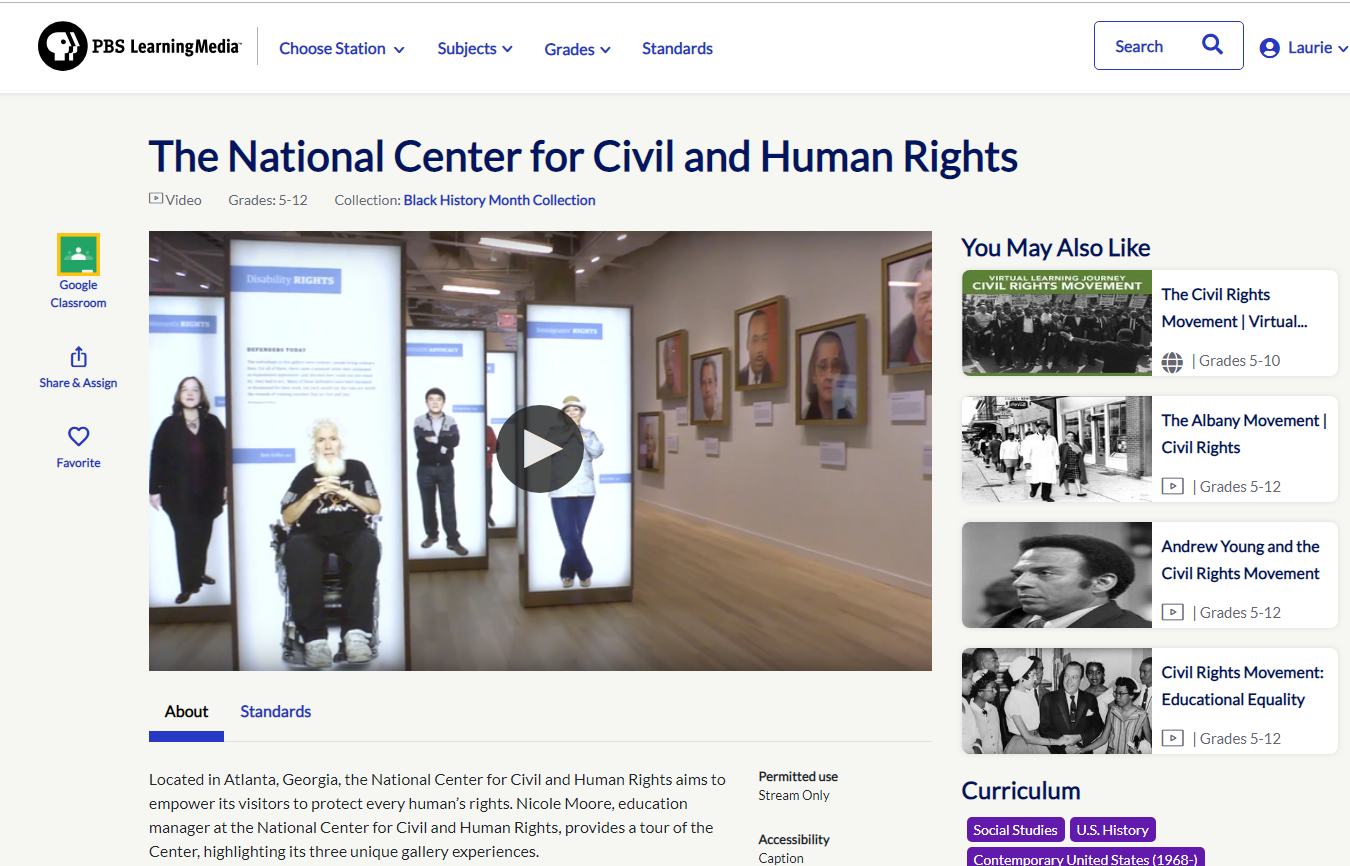
Click here to watch a video about the National Center for Civil and Human Rights in Atlanta. 


Other titles from the Collection include:

March on Washington

The Life of Poet Maya Angelou

Remembering Nelson Mandela


Image result for library
For additional resources and updates, you can visit WVIZ/PBS ideastream or reach out to Kristin Dages with questions!


Thursday, December 6, 2018

Chrome Web Store: Apps & Extensions

Over the past several weeks, there has been an increased number of instances where buggy Chrome apps and extensions have been installed on user accounts.  As a result, some users have experienced computer slowness, strange popups and adds, and other performance issues stemming from the bad Chrome app or extension being installed.  


Some of you may be wondering what Chrome extensions are. Extensions are small software programs
that customize the browsing experience. They enable users to tailor Chrome functionality and behavior
to individual needs or preferences. They live next to the omnibox (Chrome search bar) in your browser.


As a safety and security measure, going forward, staff will now need to request a Chrome app or
extension become allowed using the Unblock Request Form.  This form has been made available
on the Intranet under Forms & Portals.


Once an app or extension has been allowed, any staff member or student can install it from the
hudson.k12.oh.us section of the Chrome Web Store.  


If you would like additional information about accessing the Chrome Web Store to install an app or extension, please click here to view a short video.


Tuesday, October 30, 2018

Check It: A New Feature in Read & Write for Google Chrome

Check It is the newest feature on the Read&Write for Google Chrome toolbar that will check spelling and grammar in Google Docs
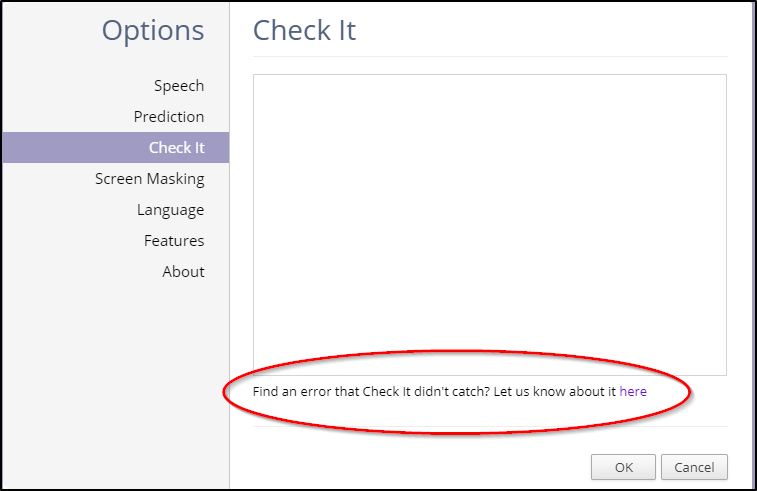
If you find an issue with Check It not finding an error or flagging text as incorrect that you feel is correct, click the dropdown arrow at the right end of the Read&Write for Google Chrome toolbar and go to Options > Check It
From there click the link at the bottom of the screen to report any issues.
Hiding Check It
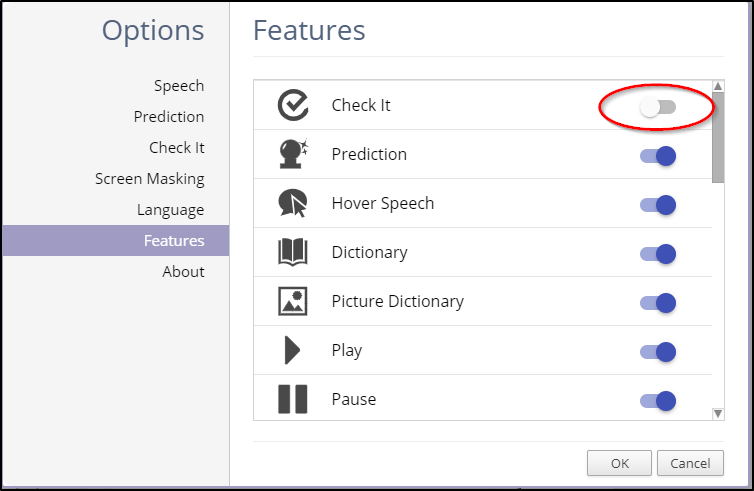
If you’d like to hide Check It, click the dropdown arrow at the right end of the Read&Write for Google Chrome toolbar and go to Options > Features
From there, you can toggle the switch to the right of any feature to the left and that will hide that feature.

Source: https://support.texthelp.com/help/check-it

Wednesday, October 17, 2018

Fun, Free Google Slides & PowerPoint Templates

Looking to jazz up your Google Slides or PowerPoint presentations and make them more visually appealing?  Check out Slides Carnival, a website that has free, catchy, colorful Google Slides & PowerPoint templates you can install. 

Friday, October 5, 2018

Removing the Securly Certificate From Your BYOD Phone

If you no longer want to be on the Staff BYOD WiFi network and would like to remove the Securly certificate from your BYOD phone, please follow the steps below.


iPhone
  • Launch Settings. 
  • Tap on General. 
  • Tap on Profile. 
  • Tap on the Securly configuration profile. 
  • Tap Remove Profile. 
  • Enter your passcode if prompted. 
  • Press Delete to confirm.

Android
  • Launch Settings 
  • Security & location 
  • Advanced 
  • Encryption & credentials 
  • Trusted credentials 
  • Tap user tab at top
  • Tap Securly, Inc. certificate and tap remove at the bottom. 
  • Tap ok to permanently remove the certificate.

Tuesday, September 25, 2018

Embedding Google Docs into Your Website

Website How-To: Embed a Google Doc

Whether you do a weekly newsletter or often link to various guides and tutorials on your website, this screencast can help walk you through the steps on how to embed it into your site. 

It also shows you how to create a HyperDoc using headings within Google Docs so that you can jump to different points in the Doc via a link at the top. 


Beware...it's 10 minutes 🙉, but hopefully, it helps answer some of the common questions on embedding within Schoolwires and helps save you time in the long run when updating weekly or monthly posts to your site. 


Some helpful Docs referenced in this video are below: